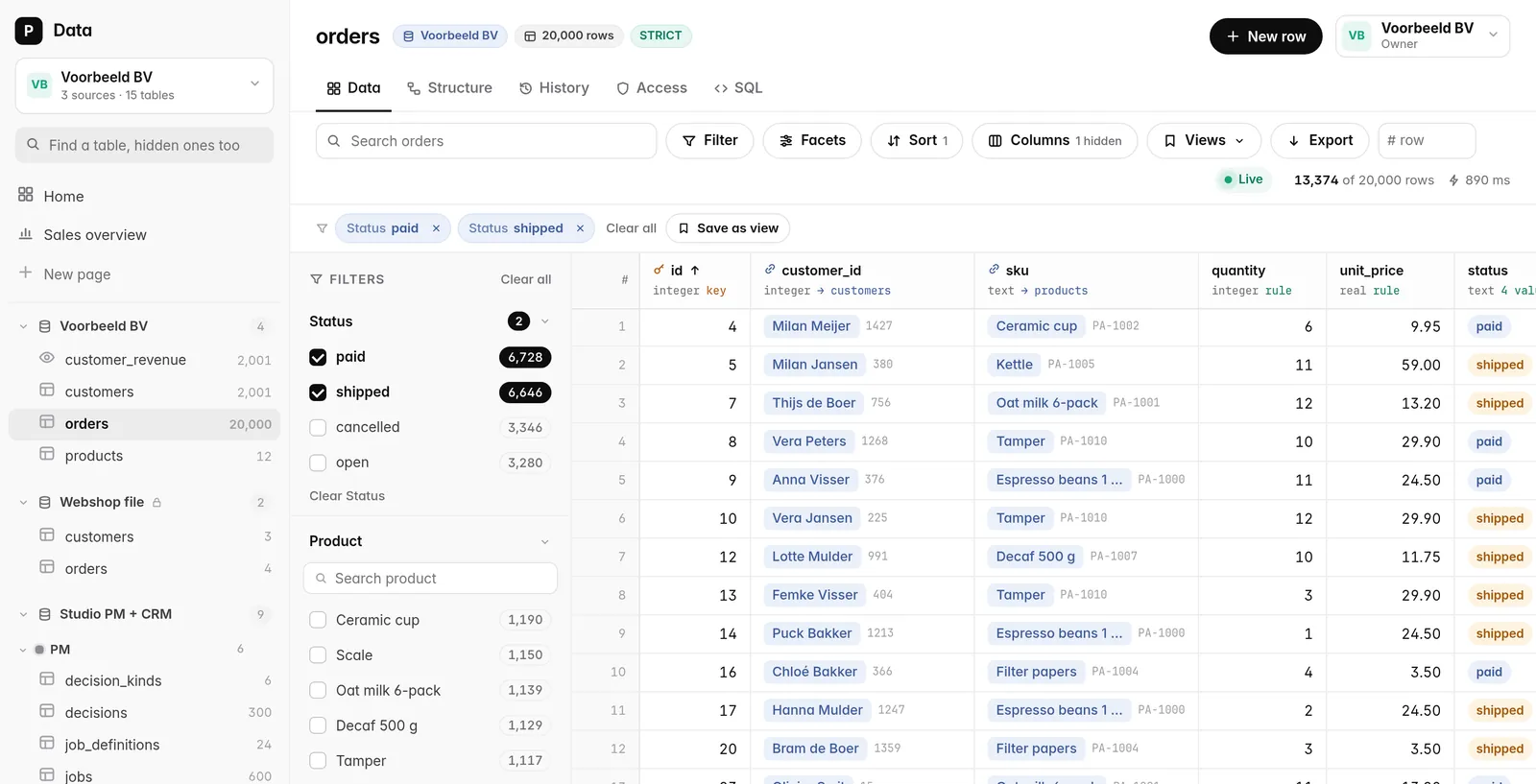
Fig. 1 An orders table with facets, a two-column sort and a live count. Demo data.
01Features
Your tables become a workspace, without building a new app.
Connect your database and PitchAI Data gives it a clear workspace right away: search, group, build pages, edit and start actions. A new use case is a new table or view, not a new app.
01Find
Find anything in seconds.
Facets with counts, AND and OR filters, in blocks smart values such as @today and @me, and sorting on up to six columns at once. Your choice lives in the link, so sharing is copying.
Facets as a sidebar or chips, with ranges and day, week and month buckets
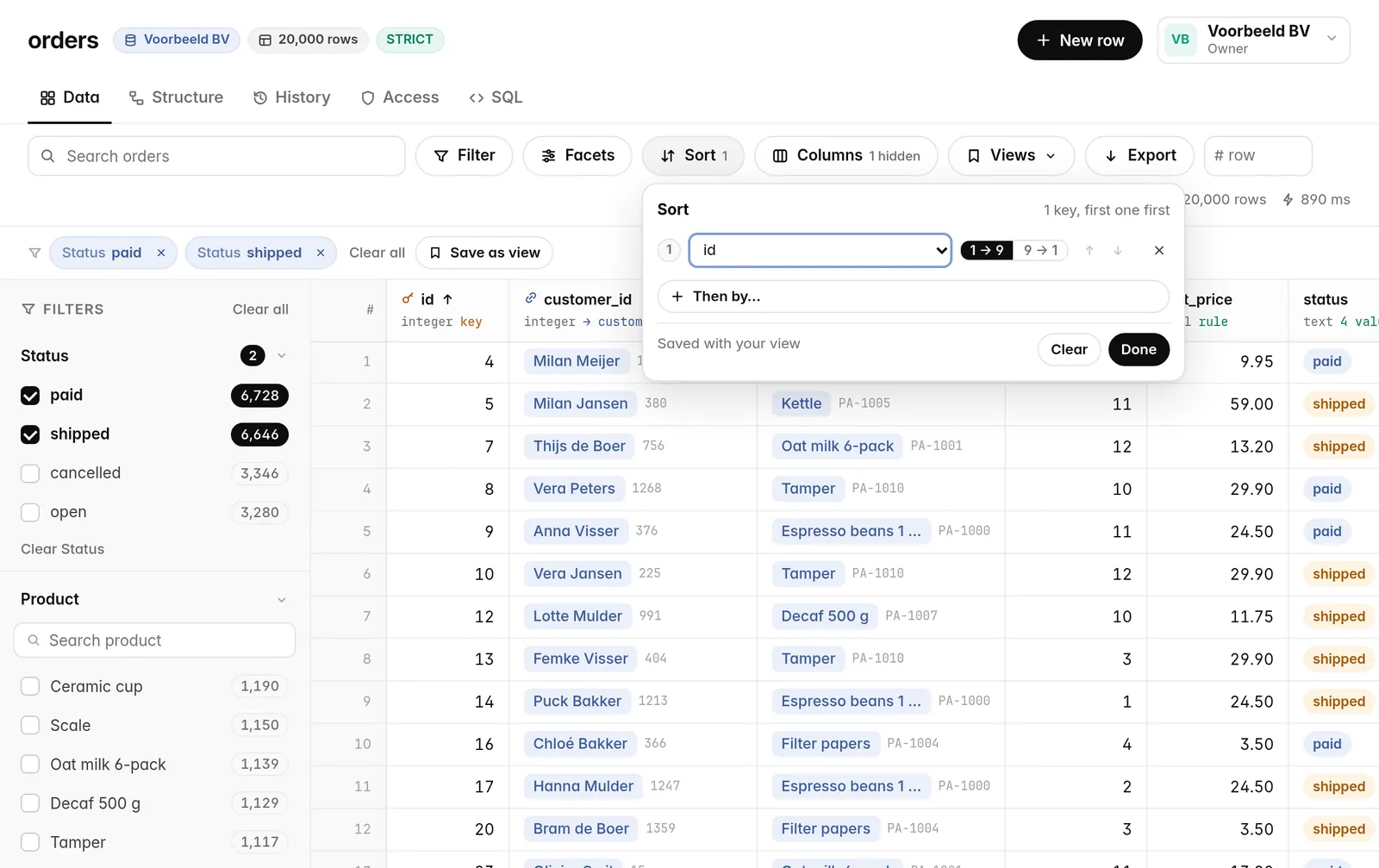
Sort on up to six columns, with a suggested index for that order
Saved views, for yourself or the whole organisation
data.pitchai.net
Fig. 2 Sorting on several columns, saved in the view. Demo data.
02Pages
Build pages from blocks.
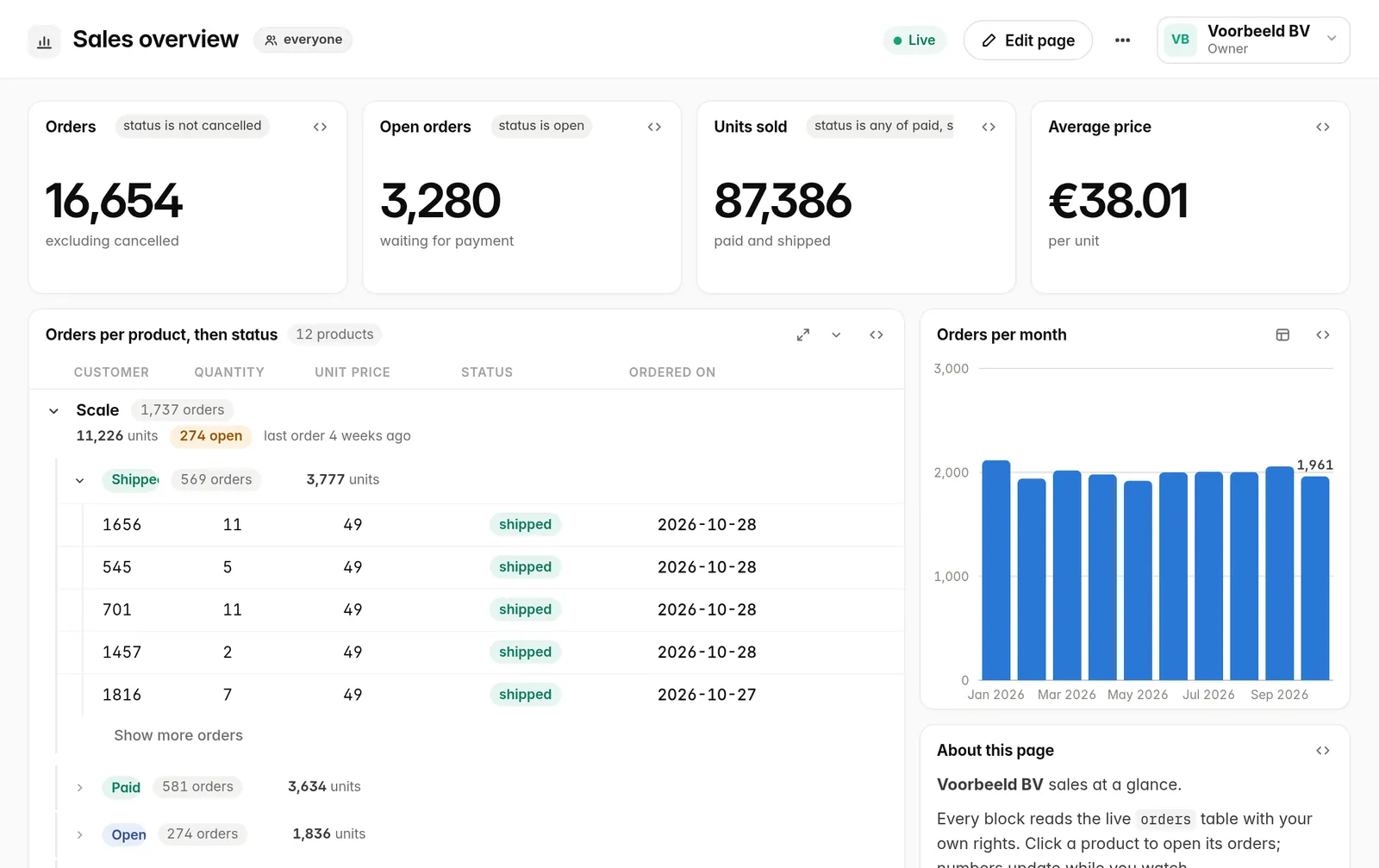
Metrics, charts, notes, related tables and grouped overviews, dragged and resized into a page. The organisation sets the base; everyone can add a personal layer on top.
Two-level grouping with sums, counts, latest value and badges
Metrics and charts that update live
One layout for the organisation, plus your own changes
data.pitchai.net
Fig. 3 A custom page: metrics, groups and a chart. Demo data.
03Live
Watch the work run.
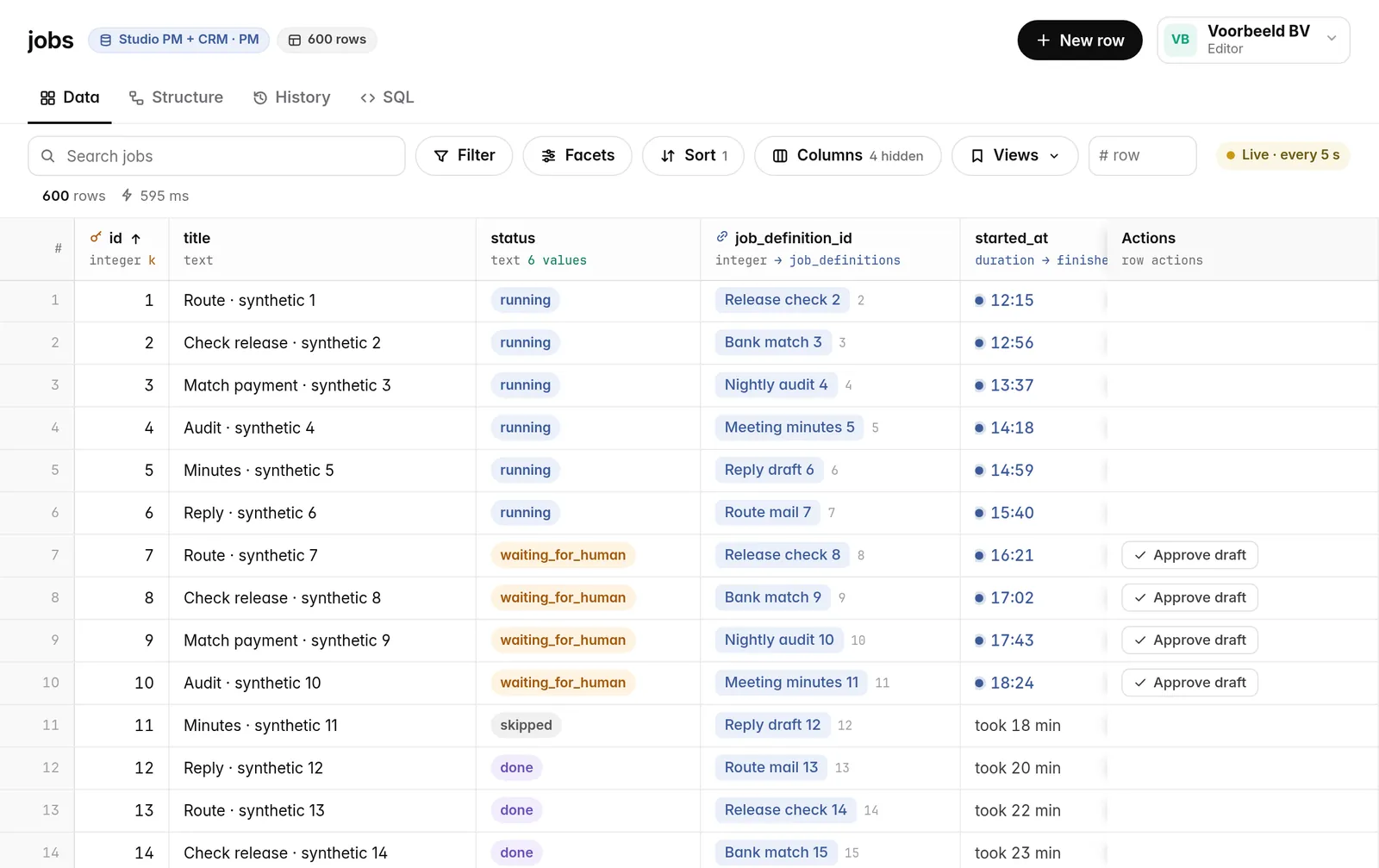
Tables are live: changed cells light up, new rows slide in and your scroll position stays put. A running job gets a ticking clock; when it is done, it says how long it took.
Live updates without refreshing
Durations that tick, then settle: took 14 min
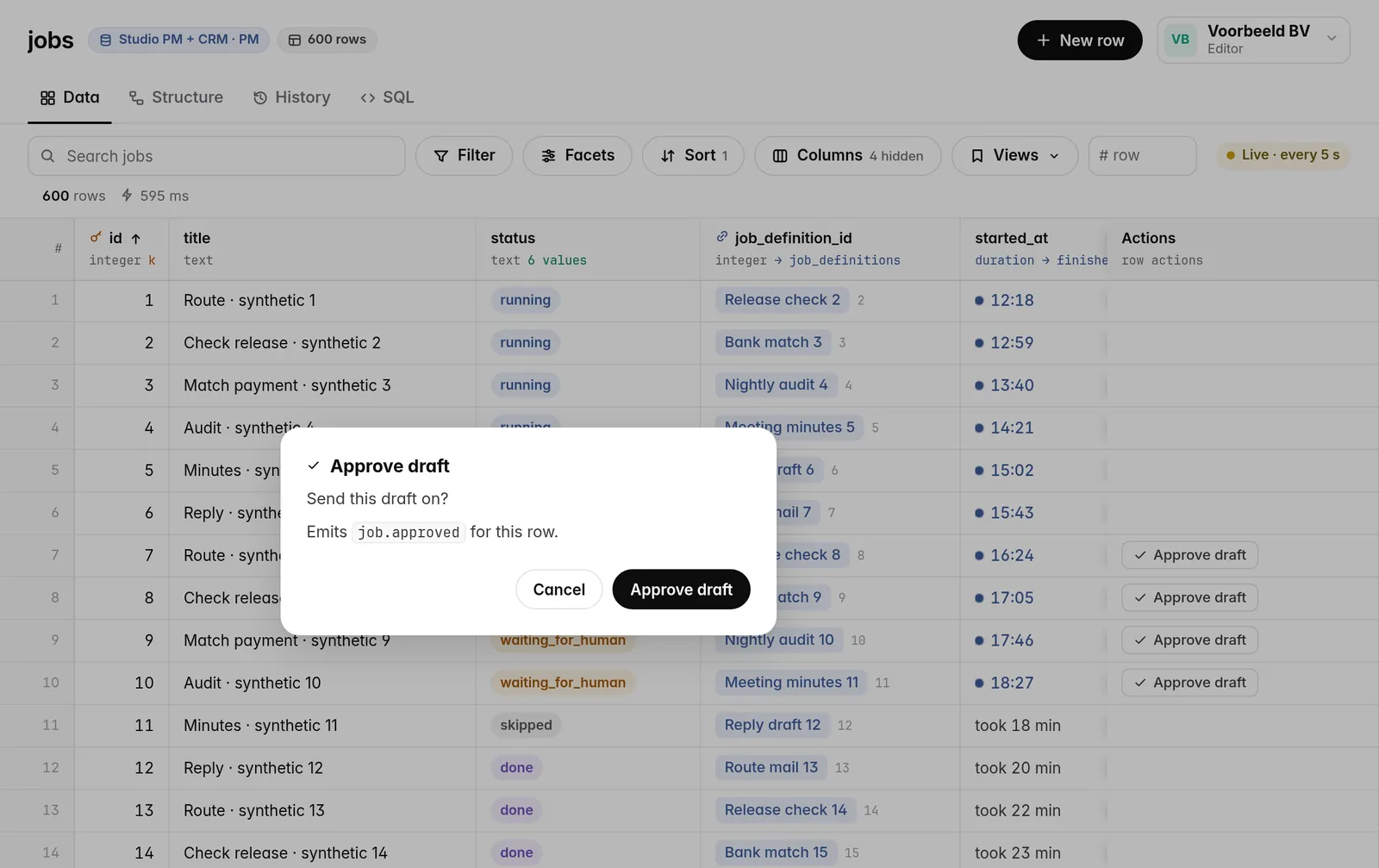
Buttons per row, such as approve or retry
data.pitchai.net
Fig. 4 A jobs table with live durations and row actions. Demo data.
04Actions
One click, and the work moves on.
Row actions such as Approve draft send an event to the Event Inbox, which starts the right work. The server checks your role and the conditions on every click, and records the click in the history.
Actions on any row, with confirmation
Role and conditions checked on the server
A preview block shows beforehand what another system would do with the row
data.pitchai.net
Fig. 5 A row action with confirmation that starts an event. Demo data.
05Safe editing
Edit within your database's rules.
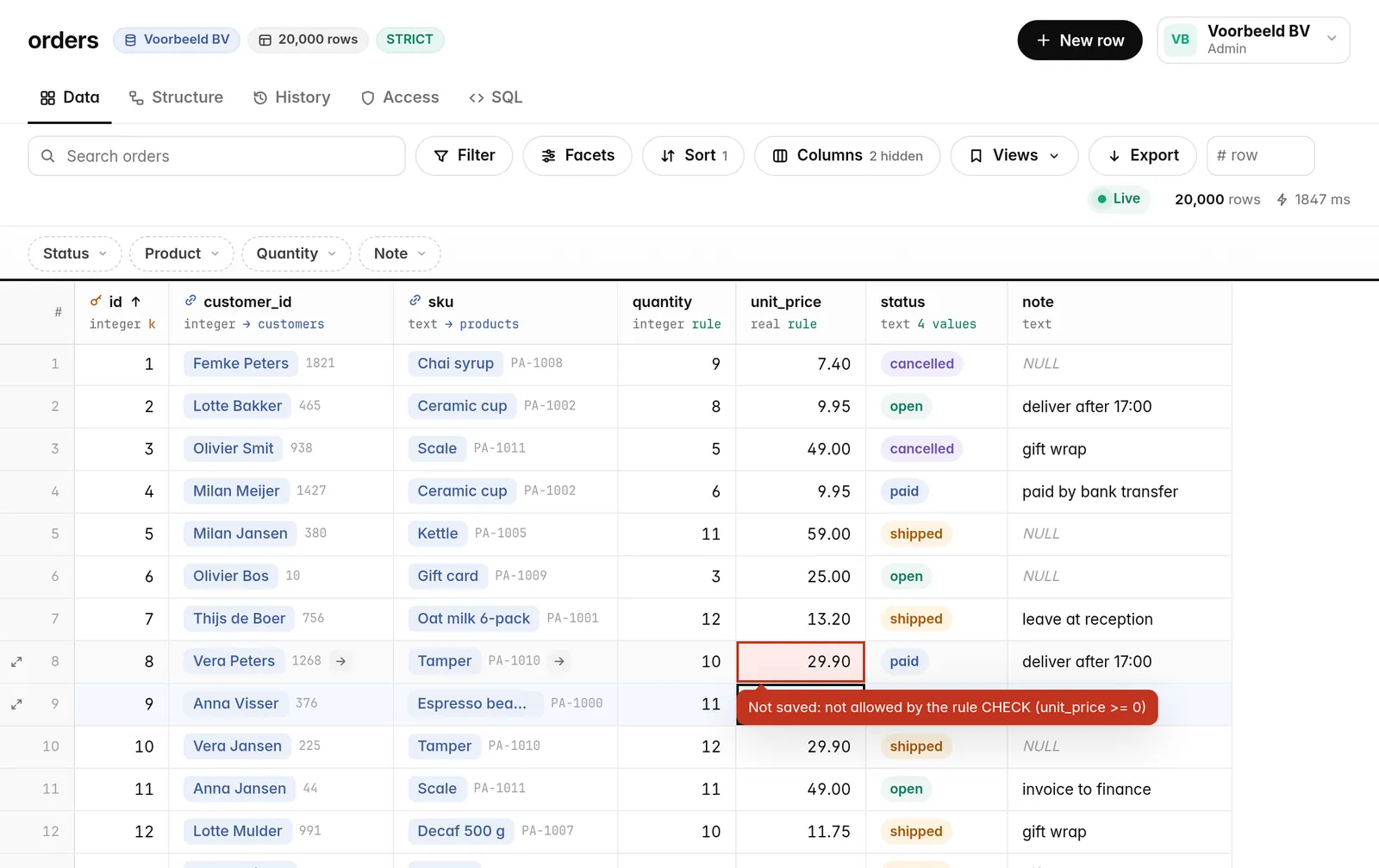
You switch editing on per table. Every change is checked against the database's own rules and refused if someone else changed the row in the meantime. Tables can be made read-only, with the reason shown.
Database rules apply here too, with a clear message
Conflict check: no silent overwrites
Read-only per table, in the database or in PitchAI Data
data.pitchai.net
Fig. 6 A change the database's rule refuses. Demo data.
06History
Who changed what, and when.
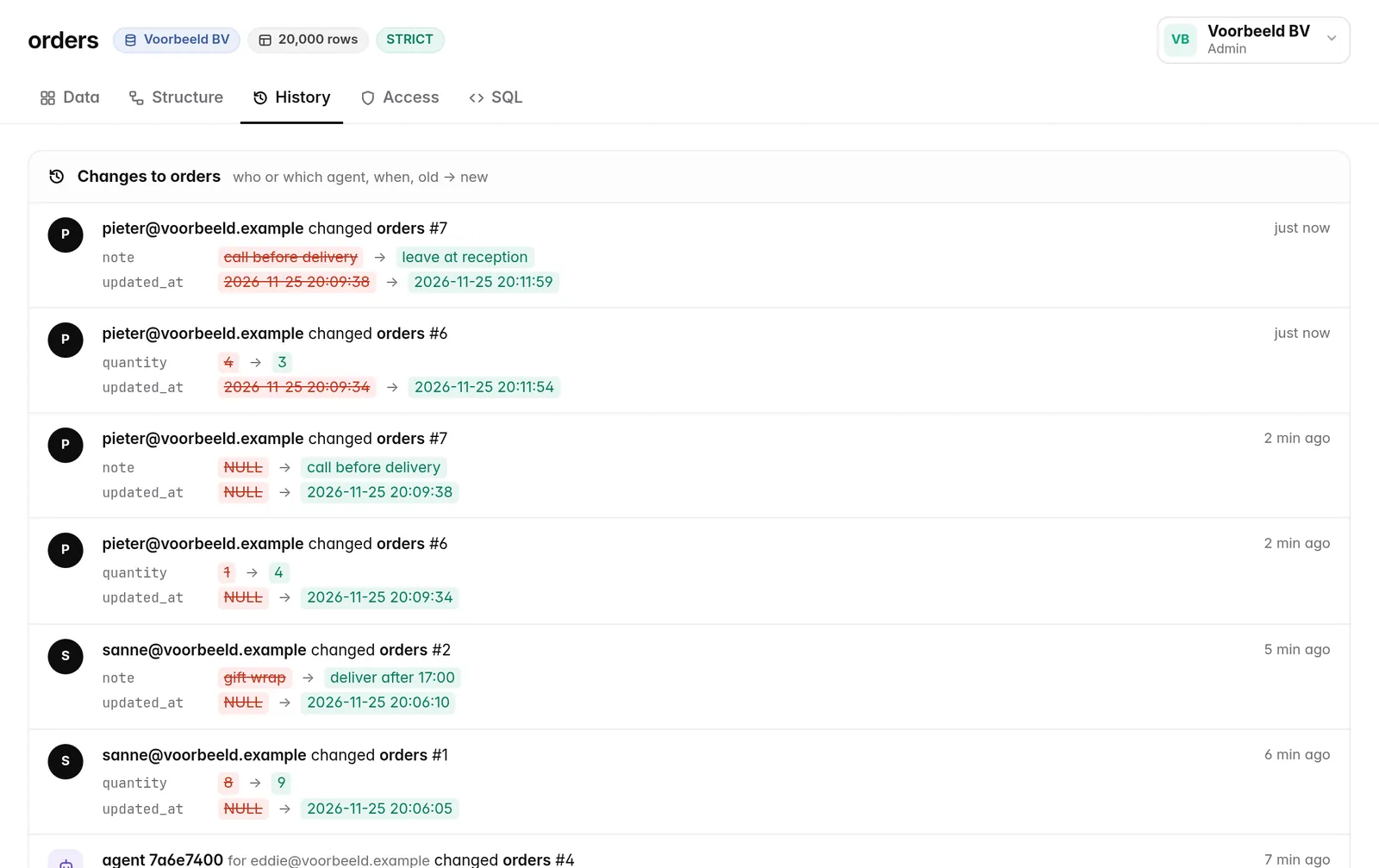
An append-only history shows every change by people and agents, from old to new. When data must go, it goes, while the trail of the change remains.
Per change: who, which agent, old and new
Append only, never rewritten
Removal with redaction, without breaking the trail
data.pitchai.net
Fig. 7 The history: every change by people and agents. Demo data.
07Records
A record reads as a sentence.
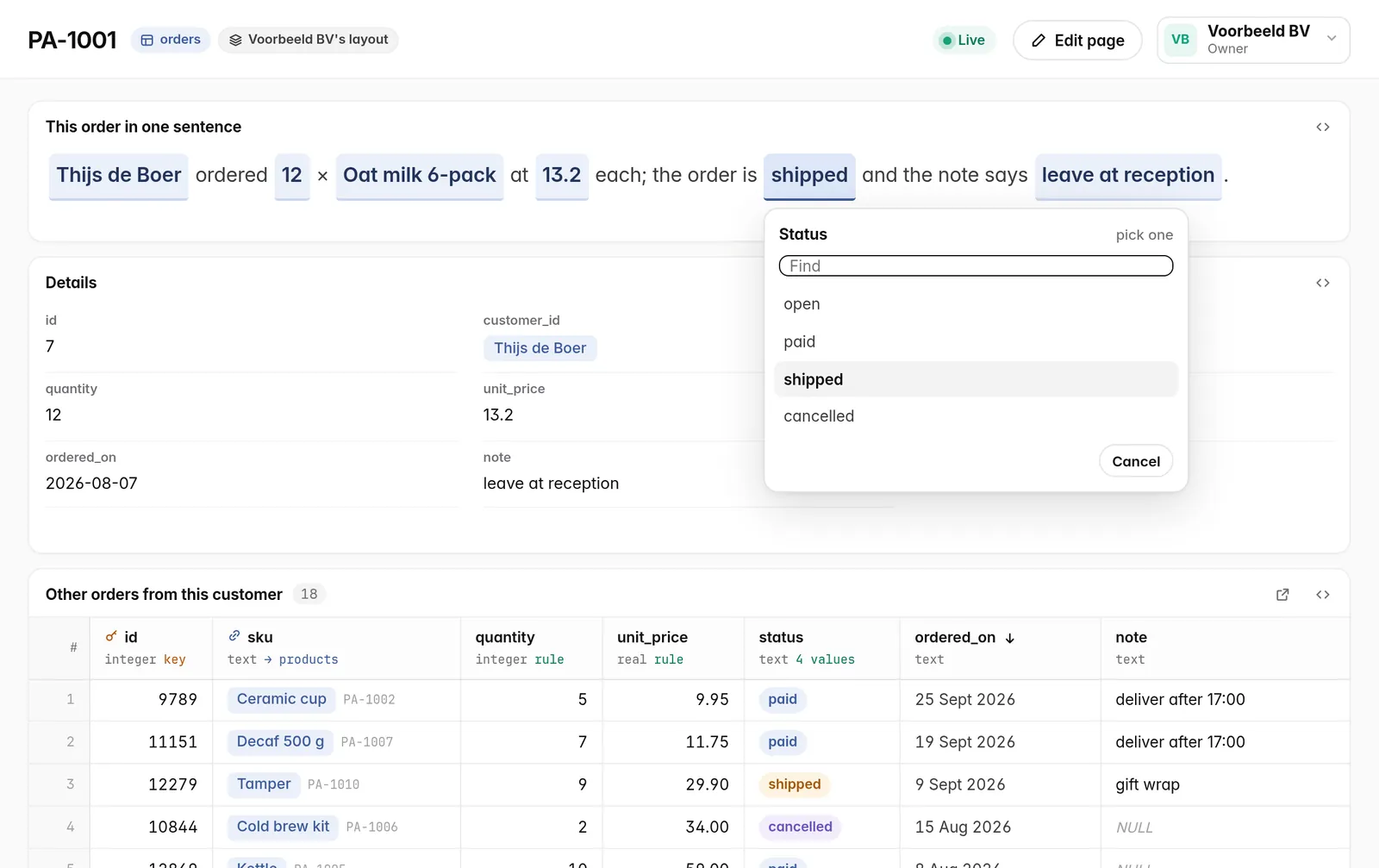
The sentence block shows a record as plain text, and every part can be changed in place. Below it are the related rows, such as this customer's other orders.
Change values in the sentence itself, from a picker
Related rows on the same page
Relations through views stay clickable too
data.pitchai.net
Fig. 8 The sentence block with related orders below. Demo data.
08Embed
Show it on your own site.
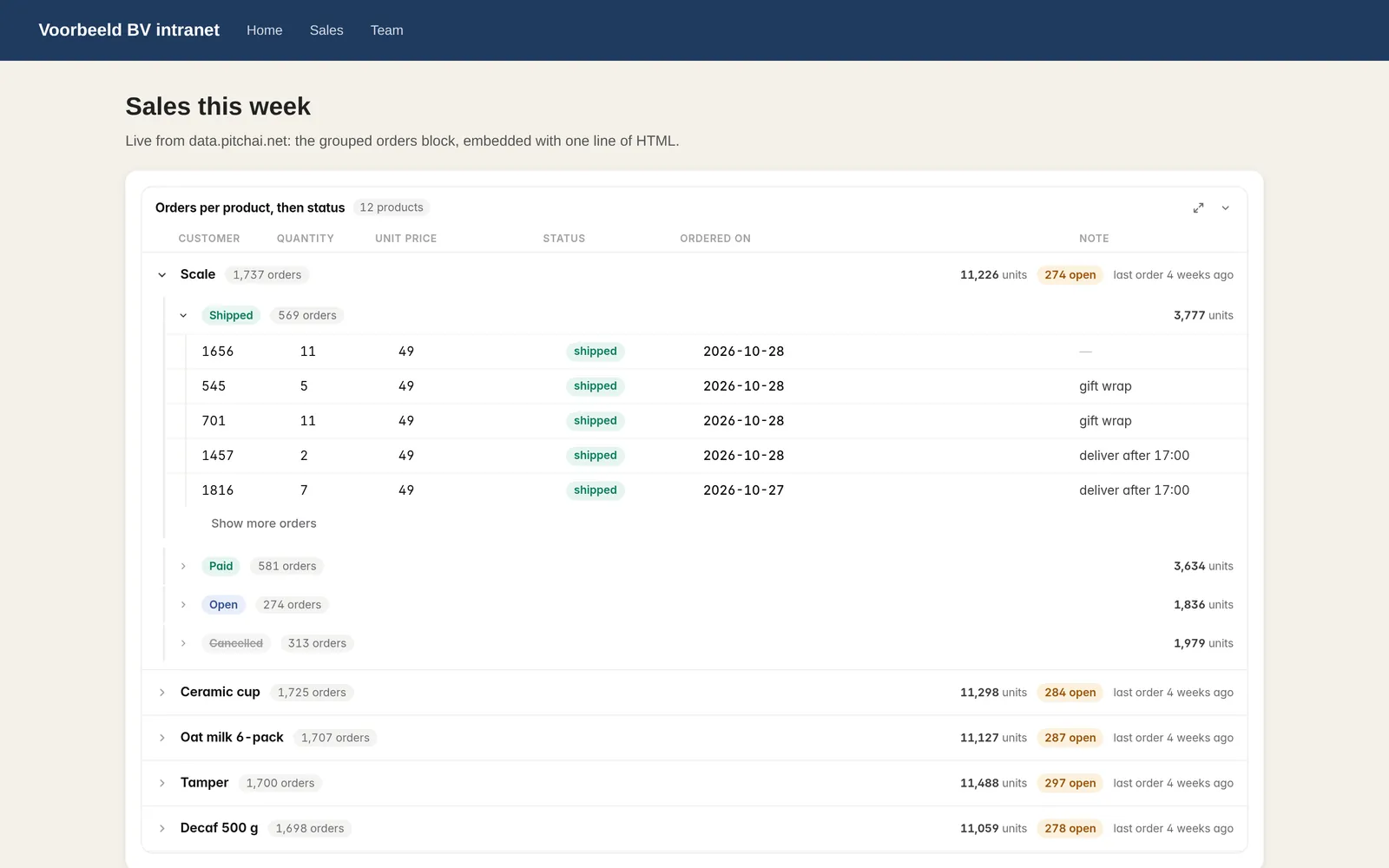
Any block can sit on another page, with one line of HTML or an iframe. The live overview lands exactly where your team already works.
One tag or an iframe
Live, with the same rights
Only on the sites you allow
data.pitchai.net
Fig. 9 A block embedded live on an intranet page. Demo data.
02All features
Everything PitchAI Data does.
Your data
Any database
SQLite, PostgreSQL, MySQL and MariaDB, SQL Server, an SQLite file or a JSON API.
Live, not copied
Linked tables are read live; connection details stored encrypted.
Views with relations
Views keep the clickable relations of their tables.
Across databases
Relations between two different databases.
Own organisation
Every organisation its own database and space.
Schema in the browser
Create and change tables from the page, every step recorded.
Test the connection
See what the login may do, with sample rows; if it can write, you get the SQL for read-only.
Your own notes
Comments from your database appear on tables and columns.
Find
Facets
Values with counts, ranges and time buckets, kept in the link.
Filters
Nested AND and OR that read as a sentence; in blocks also @me, @today and @last:7d.
Sort
Up to six columns, with a suggested index.
Views
Private or shared with the organisation.
Search and export
Search, CSV export and a read-only SQL tab.
Readable column names
For everyone or just for you.
100,000 rows
A table of a hundred thousand rows opens within a second.
Columns your way
Hide, order, resize and set your own date format.
Go to row
Jump straight to any row.
Pages
Blocks
Fields, tables, metrics, charts, notes, relations and sentences.
Grouping
Two levels with sums, counts, latest value and badges.
Two layers
The organisation's layout plus your own changes.
My items
A block with what is yours.
Embed
Any block on another site, with one tag.
Sidebar
Groups, colours, icons and pins, for everyone or just you.
Working with data
Live tables
Cells light up, new rows slide in.
Durations
A ticking clock, then how long it took.
Row actions
Buttons that send an event to the Event Inbox.
Preview
See what another system would do with a row.
Sentence block
A record as a sentence, editable in place.
JSON
View, edit, and show a key as its own column.
Relations in view
Fields of linked rows as columns, chips or one click away.
Security
Roles
Owner, admin, editor and viewer, per organisation.
Safe editing
Database rules and a conflict check on every change.
Read-only
Per table, with the reason shown.
History
Append only: who, what, old and new.
Removal
Data gone, the trail stays.
Rights per table
Hidden, read or write per role, and only your own rows.
Tested backups
Encrypted every second, 30 days back, a restore test every day.
Agents and products
Agents with your rights
Agents work with the same rows and rights as their user.
Product organisations
Every sign-up for a PitchAI product gets its own organisation.
Templates
Versioned organisation templates per product: a new sign-up is ready in about a minute.
Bulk and migrations
5,000 rows at once, schema changes in one transaction.
03How it works
From database to workspace.
01
Connect your data
Your own database, live and read-only, or the database every organisation gets.
02
Choose what people see
Readable names, views, facets and pages built from blocks.
03
Work with it
Search, edit within the rules and act with one click.
04
Agents join in
With the same rights as their user, and every change in the history.
SQLite, PostgreSQL, MySQL and MariaDB, SQL Server, an uploaded SQLite file or a JSON API. Every organisation also gets a database of its own.
Is our data copied?
No. Linked tables are read live, not copied, and connection details are stored encrypted.
Can agents work with the same data?
Yes. Agents work with the same rows and the same rights as their user, and every change by an agent is in the history.
Who may do what?
Each organisation has four roles: owner, admin, editor and viewer. You switch editing on per table, and tables can be made read-only.
What if two people edit the same row at once?
The second change is refused with a clear message, so nobody silently overwrites someone else's work.
Can we show it in our own environment?
Yes. Any block can sit on another site with one line of HTML or an iframe, on the sites you allow.
What does it cost?
PitchAI Data is part of the Managed AI Service: software, usage, setup and advice for one fixed price per month. Book a demo and we will show it on your data.
07Contact
See it on your own data.
Tell us which tables your team opens every day. We will show you how they become a workspace in PitchAI Data.